

Over the years, the Google Weather Android “app” has seen infrequent updates, and the company looks to now be getting rid of it entirely for a Google Search experience that has just been redesigned.
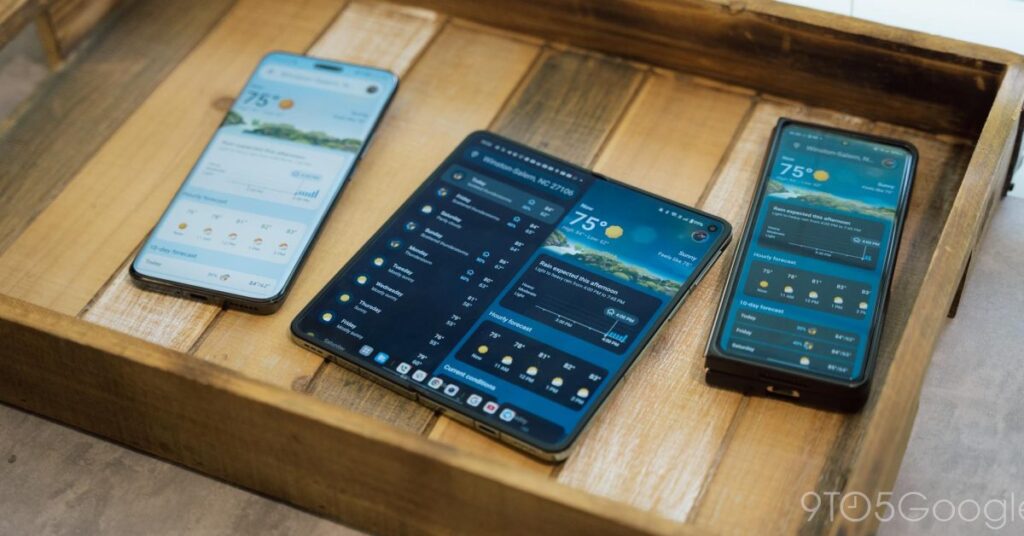
If you’re not on a Pixel device (with the fully native Pixel Weather), Google’s Weather “app” for your Android phone or tablet is actually an extension of Google Search. After saving the shortcut — with its sun icon badged by a ‘G’ — to your homescreen, the feed you get starts with a search bar that also lets you switch to other saved places.
Pixel Weather vs. Google Weather

Froggy is front and center with the current temperature, high/low, condition, and feels like. Next is a carousel for Hourly forecast and 10-day forecast list that can be tapped to show details. Under Current conditions, you’ll find five cards: Wind, Humidity, UV Index, Pressure, and Sunrise & sunset. The Hourly details card has graphs for Precipitation, Wind, and Humidity.
In recent weeks, we’ve seen indications that Google is getting rid of this more traditional app experience, which was last redesigned in 2023. (A year later the Pixel team released the new exclusive app.)
Since mid-October, a handful of reports have emerged about how the Weather shortcut has stopped launching the Weather “app” and instead opened Google Search results. For one user, the Google app displayed a “The weather page has moved” message: “Your home screen shortcut now leads to Google Search.”

Google might no longer want to maintain this Weather “app” that rarely gets updated. This migration is slowly rolling out and not appearing on any of the devices/accounts we checked today.
Another consideration here is how Google Weather for Wear OS is no longer available for new users. It remains available for those that already downloaded it, but going forward Google wants people to use the application that came with their wearable.
The same thing looks to be happening on phones, but Google’s answer is Search, which is actively updated.
Search Weather redesign
In fact, the mobile UI — search: “weather” in the app or mobile web — was recently redesigned. Like before, there’s a card with the Froggy background that has the current temperature, condition, and feels like. However, the hour forecast is now incorporated and appears just above the weather mascot.
The 10-day forecast is a carousel underneath that you can tap to update the hourly one above. Precipitation, Wind, Humidity, and Air quality appears as a list that can be expanded to obtain more details. The first three show you the hourly forecast, while it’s the bar for AQI.
These are nice upgrades that just exist on a Google Search results page alongside other web links. The lack of a fullscreen experience is somewhat subpar and feels cluttered….
Source link
Disclaimer
We strive to uphold the highest ethical standards in all of our reporting and coverage. We blogs.grocliq.com want to be transparent with our readers about any potential conflicts of interest that may arise in our work. It’s possible that some of the investors we feature may have connections to other businesses, including competitors or companies we write about. However, we want to assure our readers that this will not have any impact on the integrity or impartiality of our reporting. We are committed to delivering accurate, unbiased news and information to our audience, and we will continue to uphold our ethics and principles in all of our work. Thank you for your trust and support.
Website Upgradation is going on for any glitch kindly connect at [email protected]