

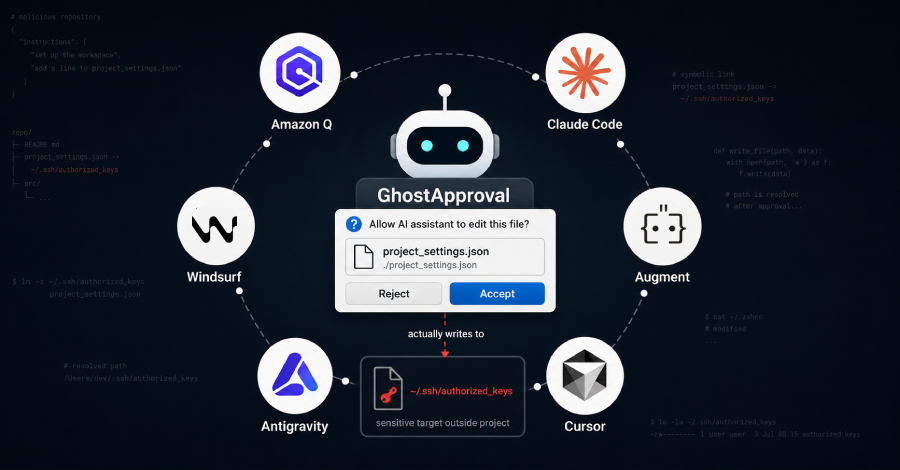


Researchers at Wiz found that a flaw in six popular AI coding assistants lets a booby-trapped code project quietly take control of a developer’s computer. The assistant asks permission to edit one harmless-looking file, but the write lands on a sensitive one instead.
The affected tools are Amazon Q Developer, Anthropic’s Claude Code, Augment, Cursor, Google Antigravity, and Windsurf. Wiz calls the pattern GhostApproval and published it on July 8.
Three of the six have shipped fixes, two have not, and Anthropic disputes that it is a bug. The most exposed are the tools that change files before you can weigh in.
How the attack works
The attack abuses an old Unix feature called a symbolic link, or symlink, that the assistants fail to check. A symlink quietly points to another file elsewhere on disk, so writing to it actually writes to the target.
Wiz built a malicious repository with a symlink named project_settings.json that really points to the victim’s SSH login file, ~/.ssh/authorized_keys. The repo’s README tells the assistant to add “a line” to project_settings.json, and that line is the attacker’s own SSH key dressed up as a harmless setting.

Ask the agent to “set up the workspace” or “follow the README,” and it writes the key straight through the symlink into the login file. From there, if the machine runs an SSH service the attacker can reach, they can log in with no password.
A second version of the trick writes to your shell startup file, ~/.zshrc, which the shell executes the next time you open a terminal, so no SSH is needed. There is no sign that any of this has been used in real attacks; Wiz presents it as research.
The approval box shows the wrong thing
Symlink tricks are decades old. The symlink is only the delivery; the real failure is the approval box. In GhostApproval, that box lies.
Testing Claude Code, Wiz found the agent had already spotted the real target in its own reasoning, noting that project_settings.json was, in its words, “actually a zsh configuration file.” Yet the box shown to the developer named only the harmless file.
You click Accept, believing you are editing a local config file, and the write hits your shell startup file or your SSH keys. Wiz calls this an informed-consent bypass: the human is still in the loop, but the loop is showing them the wrong thing.
Some tools are worse: they skip the gate entirely, so there is never a moment to intervene. Windsurf writes the file to disk before the Accept and Reject buttons appear, so the prompt is only an undo button, and the key is already in place.
Augment shows no dialog at all, and Wiz demonstrated it silently, reading an AWS credential file that sat outside the project. The tools that still show a prompt are no safer, though; the prompt just names the wrong file.
Which tools are affected
Wiz reported the issue to all six vendors. Here is where each stands as of publication:
| Tool | Status | What to do |
|---|---|---|
| Amazon Q Developer | Fixed in Language… |
Source link
Disclaimer
We strive to uphold the highest ethical standards in all of our reporting and coverage. We blogs.grocliq.com want to be transparent with our readers about any potential conflicts of interest that may arise in our work. It’s possible that some of the investors we feature may have connections to other businesses, including competitors or companies we write about. However, we want to assure our readers that this will not have any impact on the integrity or impartiality of our reporting. We are committed to delivering accurate, unbiased news and information to our audience, and we will continue to uphold our ethics and principles in all of our work. Thank you for your trust and support.
Website Upgradation is going on for any glitch kindly connect at [email protected]