

Cybersecurity researchers have discovered a new ransomware strain dubbed HybridPetya that resembles the notorious Petya/NotPetya malware, while also incorporating the ability to bypass the Secure Boot mechanism in Unified Extensible Firmware Interface (UEFI) systems using a now-patched vulnerability disclosed earlier this year.
Slovakian cybersecurity company ESET said the samples were uploaded to the VirusTotal platform in February 2025.
“HybridPetya encrypts the Master File Table, which contains important metadata about all the files on NTFS-formatted partitions,” security researcher Martin Smolár said. “Unlike the original Petya/NotPetya, HybridPetya can compromise modern UEFI-based systems by installing a malicious EFI application onto the EFI System Partition.”
In other words, the deployed UEFI application is the central component that takes care of encrypting the Master File Table (MFT) file, which contains metadata related to all the files on the NTFS-formatted partition.

HybridPetya comes with two main components: a bootkit and an installer, with the former appearing in two distinct versions. The bootkit, which is deployed by the installer, is chiefly responsible for loading its configuration and checking its encryption status. It can have three different values –
- 0 – ready for encryption
- 1 – already encrypted, and
- 2 – ransom paid, disk decrypted
Should the value be set to 0, it proceeds to set the flag to 1 and encrypts the \EFI\Microsoft\Boot\verify file with the Salsa20 encryption algorithm using the key and nonce specified in the configuration. It also creates a file called “\EFI\Microsoft\Boot\counter” on the EFI System Partition prior to launching the disk encryption process of all NTFS-formatted partitions. The file is used to keep track of the already encrypted disk clusters.
Furthermore, the bootkit updates the fake CHKDSK message displayed on the victim’s screen with information about the current encryption status, while the victim is deceived into thinking that the system is repairing disk errors.
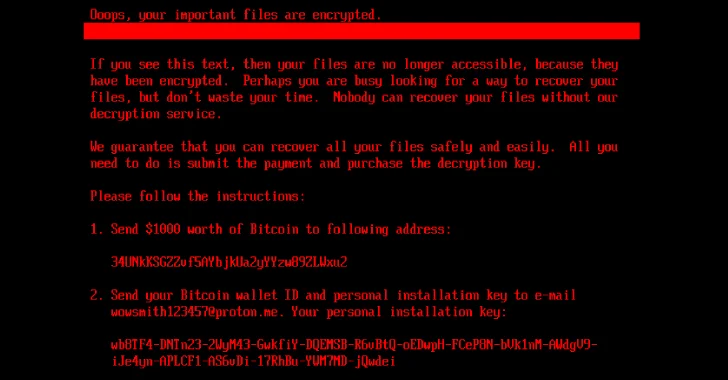
If the bootkit detects that the disk is already encrypted (i.e., the flag is set to 1), it serves a ransom note to the victim, demanding them to send $1,000 in Bitcoin to the specified wallet address (34UNkKSGZZvf5AYbjkUa2yYYzw89ZLWxu2). The wallet is currently empty, although it has received $183.32 between February and May 2025.
The ransom note screen also provides an option for the victim to enter the deception key purchased from the operator after making the payment, following which the bootkit verifies the key and attempts to decrypt the “EFI\Microsoft\Boot\verify” file. In the event the correct key is entered, the flag value is set to 2 and kicks off the decryption step by reading the contents of the “\EFI\Microsoft\Boot\counter” file.
“The decryption stops when the number of decrypted clusters is equal to the value from the counter file,” Smolár said. “During the process of MFT decryption, the bootkit shows the…
Source link
Disclaimer
We strive to uphold the highest ethical standards in all of our reporting and coverage. We blogs.grocliq.com want to be transparent with our readers about any potential conflicts of interest that may arise in our work. It’s possible that some of the investors we feature may have connections to other businesses, including competitors or companies we write about. However, we want to assure our readers that this will not have any impact on the integrity or impartiality of our reporting. We are committed to delivering accurate, unbiased news and information to our audience, and we will continue to uphold our ethics and principles in all of our work. Thank you for your trust and support.
Website Upgradation is going on for any glitch kindly connect at [email protected]