

Remarketing lists continue to be one of the more dependable tools inside PPC accounts, especially for search campaigns. They give advertisers clearer control over who sees ads, how bids are adjusted, and how messaging aligns with prior brand interaction.
As tracking becomes more constrained and audience signals less granular, first-party data carries more weight in day-to-day performance.
Remarketing allows you to act on what users have already done, rather than relying entirely on inferred intent or broad audience definitions.
Where many accounts fall short is in how those lists are actually applied. Lists get created, added at observation, and then largely ignored.
Without a clear purpose tied to bidding, exclusions, or messaging, remarketing ends up being underutilized.
The strategies below focus on remarketing lists that directly influence PPC decisions. Each example is designed to support how users move through the funnel and how accounts are realistically managed, not how they look in theory.
Top-Of-Funnel & Awareness Remarketing Strategies
These three remarketing strategies cover the basics of top-of-funnel marketing and utilize different campaign types to help leverage your RLSAs.
1. Target Users Who Have Engaged With A Video Campaign And Encourage Them To Take Action
If you’ve tried YouTube Ads in any form and have struggled to determine or quantify success, then this strategy might be for you.
YouTube ads are a great way to gain awareness of a product, service, or brand – but how do you get a new user to take action from that first touchpoint?
Enter in remarketing lists.
Google Ads allows you to create different types of remarketing lists based on your YouTube videos. There are two key requirements for using this list type:
- These lists can only be used in other YouTube or Search campaigns – not Display.
- Your YouTube channel must be linked to your Google Ads account.
To set up YouTube remarketing lists, navigate to Tools > Shared Library > Audience Manager.
In Audience Manager, hit the “+” button to start segmenting your YouTube remarketing lists.

From there, Google gives a multitude of options to start leveraging your YouTube video engagement for remarketing. These options include engagement from:
- Views to videos.
- Subscribes to the channel.
- Visits to the channel.
- Likes on videos.
- Add videos to playlist.
- Shares of videos.
Further, you’re able to segment further to make your remarketing lists as specific as possible:
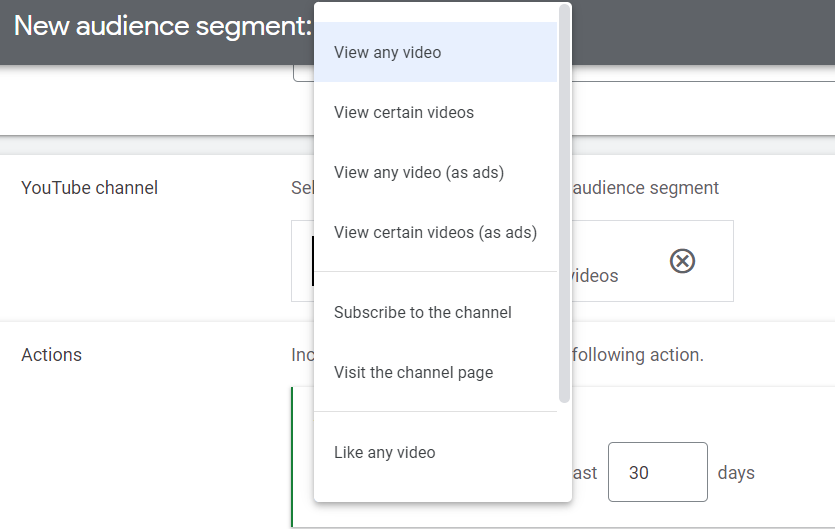
To leverage these newly created YouTube remarketing lists, try adding them to your existing Search campaigns as “Observation Only” at first to understand if these users are more likely to interact with your campaigns versus someone who hasn’t seen your YouTube videos.
Taking it a step further, you can create new Search campaigns that specifically target these users.
The benefit is that you can provide different messaging to these…
Source link
Disclaimer
We strive to uphold the highest ethical standards in all of our reporting and coverage. We blogs.grocliq.com want to be transparent with our readers about any potential conflicts of interest that may arise in our work. It’s possible that some of the investors we feature may have connections to other businesses, including competitors or companies we write about. However, we want to assure our readers that this will not have any impact on the integrity or impartiality of our reporting. We are committed to delivering accurate, unbiased news and information to our audience, and we will continue to uphold our ethics and principles in all of our work. Thank you for your trust and support.
Website Upgradation is going on for any glitch kindly connect at [email protected]